Using Metadata and Content Controls to build better Word templates

Discover how metadata, content controls, and form fields in Microsoft Word can transform ordinary templates into structured, intelligent documents. Learn practical techniques used in proposals, legal documents, and forms to reduce errors and improve document consistency.

Using Metadata and Content Controls to build better Word templates

Posted on

18 March 2026

Reading time

±5 minutes read

Section

Document Design

Industry

Professional Services

Services

Template Development

Let’s build smarter Word templates.

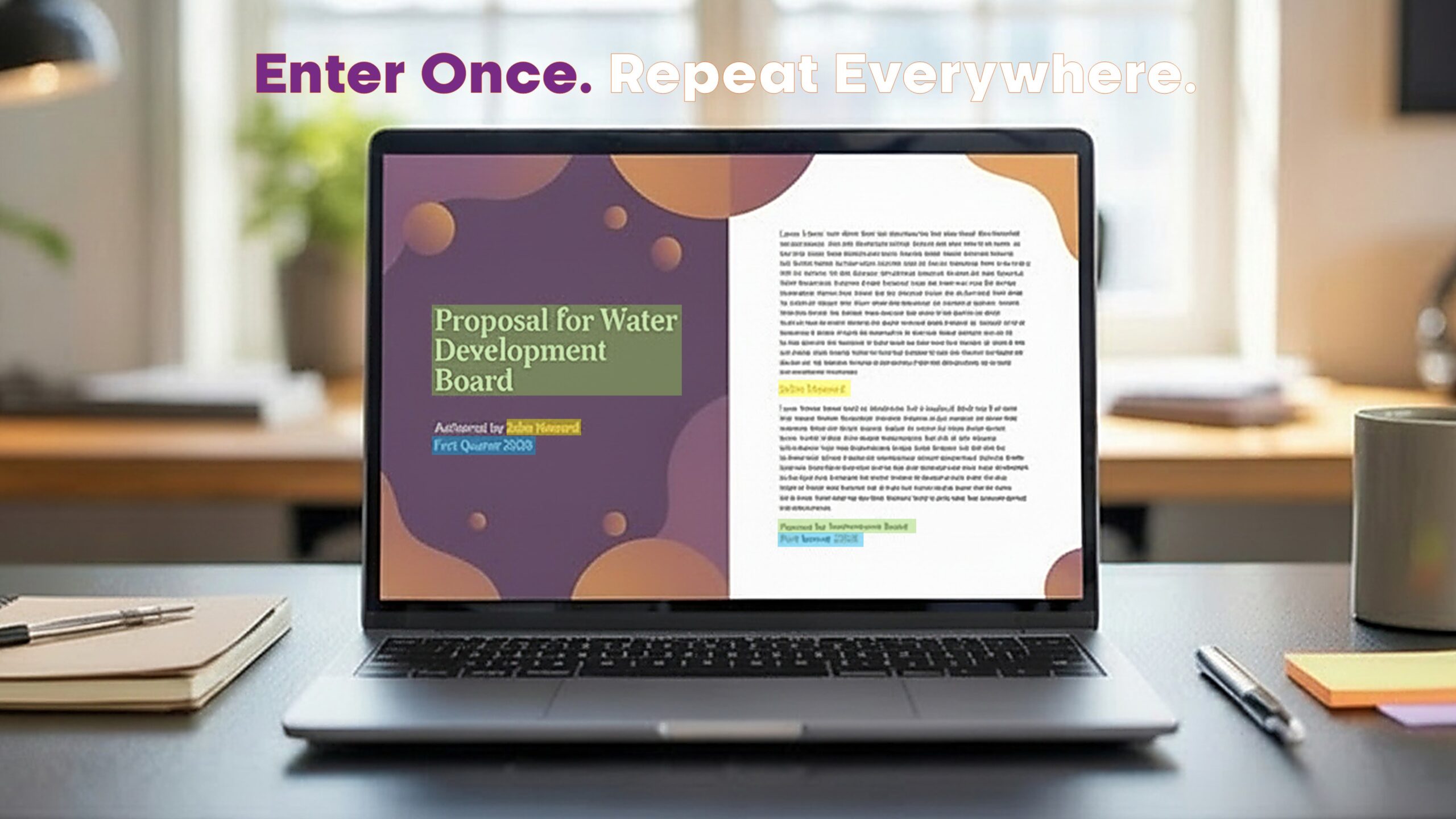
Laptop screen displaying a Microsoft Word proposal template where the author name and document details repeat automatically across pages using content controls and metadata fields.

Most business documents look fine on the surface, but working with them can often feel frustrating. The moment you update a name in one section, you have to manually do the same on the cover page, headers, footers, and throughout the rest of the file. Dates do not match. Job titles get missed. Revisions introduce inconsistencies. These are small issues that, over time, cause errors, confusion, and lost time—especially when documents are passed between teams or reused for multiple projects.

Microsoft Word already offers powerful built-in features to prevent this—but many templates fail to make proper use of them. Features such as metadata, content controls, and form fields are often overlooked. When used correctly, they can transform a document from a passive layout into an intelligent tool that guides the user, reduces duplication, and maintains consistency across every page. And the best part is, this can be achieved without using automation platforms or external plugins.
Microsoft Word templates can do more than look good—they can work smarter too.

Metadata helps you structure hidden document information like title, author, subject, and version. These properties can then be dynamically displayed within headers, footers, and content areas using Word’s native fields. Content controls take this a step further. They allow you to create placeholders that users can click into, type once, and see repeated across the document. You can even insert dropdown menus or date pickers to standardise inputs and reduce errors.

This becomes especially useful in documents that contain a high degree of repeated or structured information. For example, legal documents that reference a matter ID or party name multiple times. Proposal templates that reuse company name, project title, and submission date across different sections. Forms that prompt the user to fill in contact details, funding amounts, or terms—all of which need to be accurate and complete.

One edit, many updates. Templates that respond to how real users work.

Here are some practical ways to use these features in Microsoft Word to improve document quality and reduce manual effort:

  • Use metadata fields to populate titles, client names, or project IDs consistently

  • Insert content controls for key information that appears more than once

  • Apply form fields to prompt user input and reduce formatting risks

  • Restrict editing for certain fields to protect brand and legal content

  • Include dropdowns, checkboxes, or date pickers to streamline completion

  • Use document properties for searchability and content classification

  • Group related content into sections that auto-update with user input

When done properly, this results in templates that are easier to complete, harder to break, and more reliable over time. Staff members do not need to remember where every detail goes—because the template does the remembering for them. It also makes onboarding smoother, because new users are guided by the structure rather than trained on formatting rules.

The right template design saves time on every document that follows.

At ZOARC Creative, we apply these techniques across a wide range of Microsoft Word templates. From legal agreements and client-facing proposals to forms, reports, and internal briefing packs—we design templates that prioritise structure, clarity, and ease of use. Instead of relying on automation tools, we use Word’s native capabilities to build solutions that are flexible, future-proof, and brand-compliant.

If your organisation uses Microsoft Word extensively, there is often a better way to build. These tools are already at your fingertips. Our role is to help you make the most of them—through templates that are designed for the way your users actually work.

Explore more...

Bespoke fonts can strengthen branding, but they also introduce risk in Word....
Many rebrands look perfect in guidelines but fall apart in daily documents.....
AI can generate reports and documents in seconds, but it cannot replace....